API and webhooks
Load your articles into your own site, and rebuild when one changes.
 JoshUpdated 3 min read
API Documentation
When you publish a blog through our API, you can display them however you wish on your website. Just like in a headless CMS, we provide the data, you provide your own design.
Go to Publishing > Your Blog > API > Settings
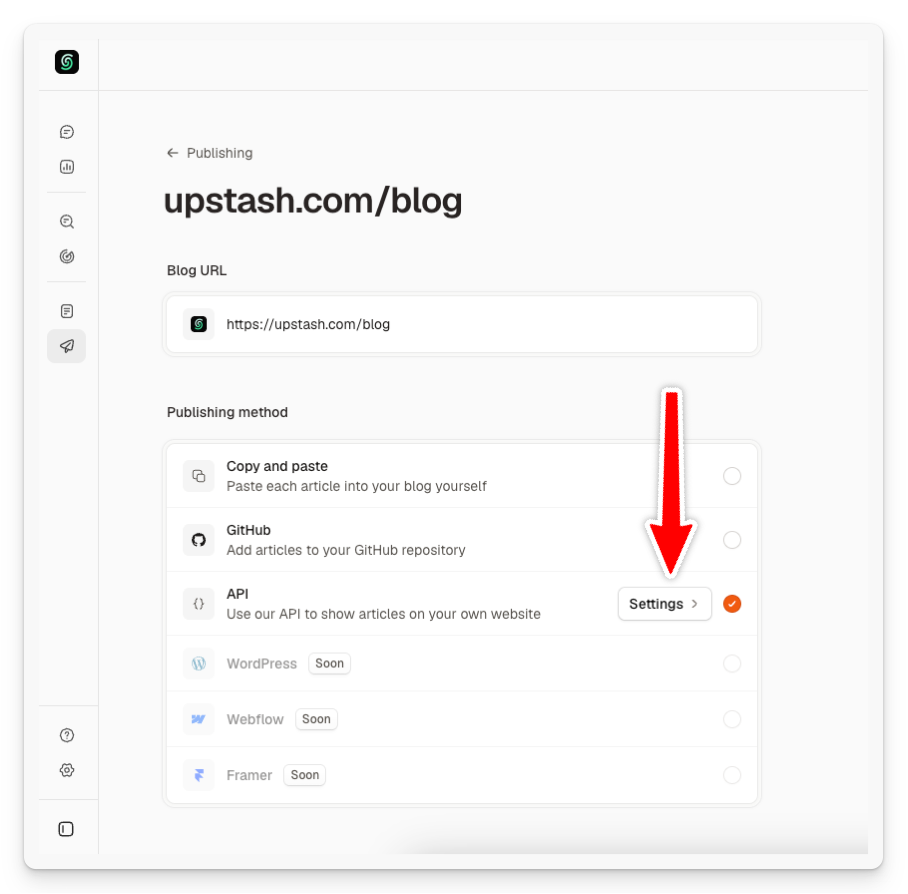
Authentication
Send the key from the blog's API page as a bearer token:
We recommend storing this as an environment variable on the platform you deploy to.
List articles
Get your live articles on GET /api/v1/articles. You'll get the newest first, up to 100 per page. Page through them with limit (1 to 100) and offset. hasMore tells you whether another page follows.
Get one article
GET /api/v1/articles/:slug returns { "article": … }, or a 404 when no live article has that slug.
Every image, in the body and in the authors' photos, is on cdn.bydefault.so. That's the one host to allow, in next/image or in a content security policy's img-src.
Webhooks
Add a URL under Webhooks on the API page and we POST to it whenever an article changes, so your site can rebuild or revalidate that page. Send test sends one right away with your newest article.
Every request carries three headers: X-ByDefault-Event, X-ByDefault-Delivery (one id per attempt) and X-ByDefault-Signature.
Answer with any 2xx within 10 seconds. If your site answers with anything else, or doesn't answer, we try again up to 3 times. Every attempt shows on the API page with what your site answered.
Verify a webhook
The signature is sha256= followed by the HMAC-SHA256 of the raw body, keyed with your API key. Check it before you trust the body:
Troubleshooting
I get a 401
Authorization: Bearer <key>, and check that it's the current key: making a new one stops the old one.I get a 400
limit must be a whole number from 1 to 100, and offset a whole number from 0.My site still shows the old version
Webhook deliveries fail
Did this answer your question?