ByDefault MCP
Connect Claude, ChatGPT, Cursor, Codex or any MCP client to ByDefault.
 JoshUpdated 4 min read
ByDefault's MCP server lets your own AI agent read your visibility, add prompts, and write and publish articles in ByDefault. It works with any client that supports remote MCP servers, and it comes with every plan.
Every client uses the same server URL:
You don't need a key. The first time a client connects, it sends you to ByDefault to approve the connection. Settings → MCP has the same setup, ready to copy.
Claude
Add ByDefault once, on the web or in the desktop app, and it works in Claude on every device.
- Open Customize → Connectors.
- Click Add, then Add custom connector.
- Enter
ByDefaultas the name and paste the server URL. - Click Continue and connect. Claude sends you to ByDefault to approve the connection.
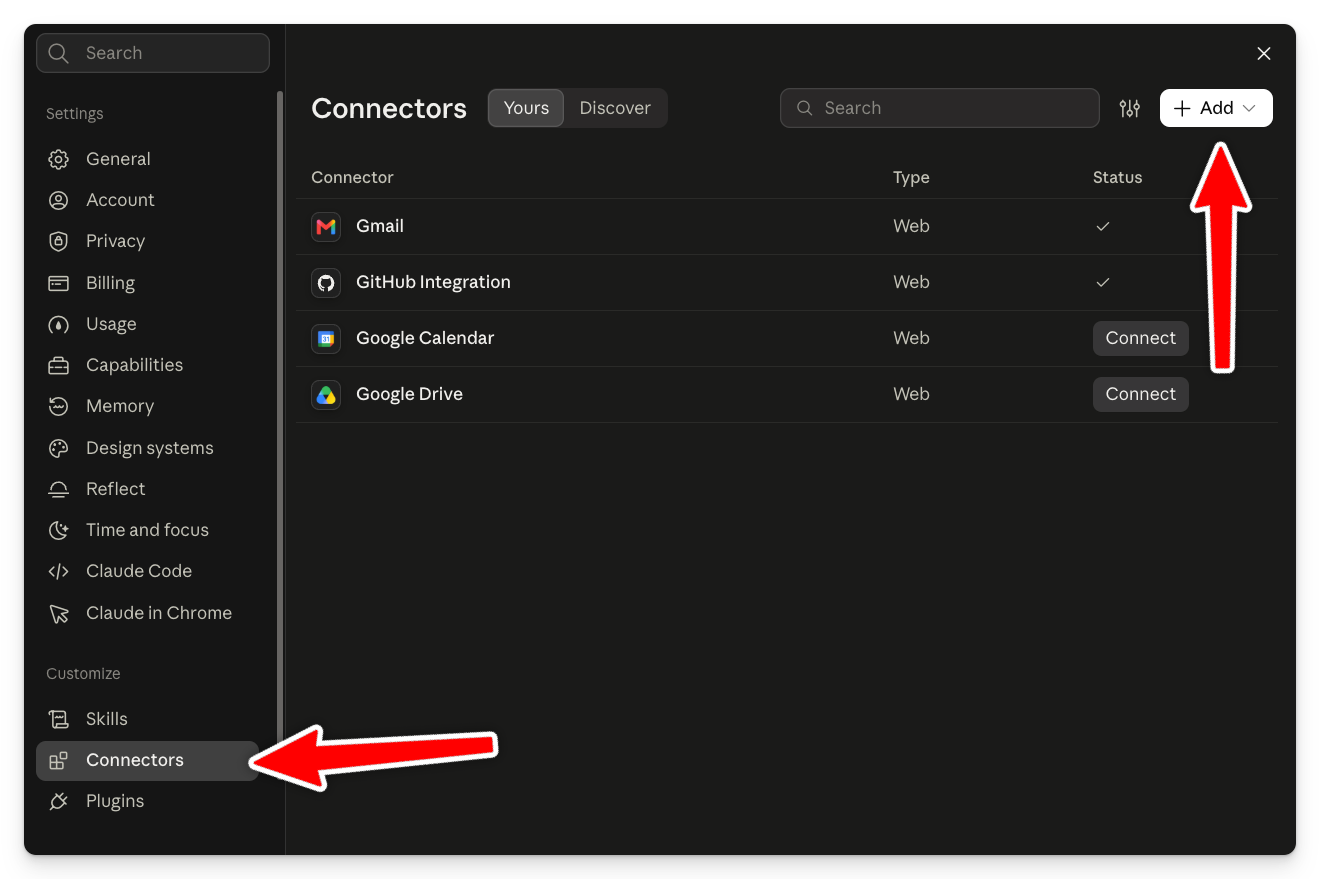
On a Team or Enterprise plan, an owner adds the connector for the organization first. Each member then connects it under Customize → Connectors.
ChatGPT
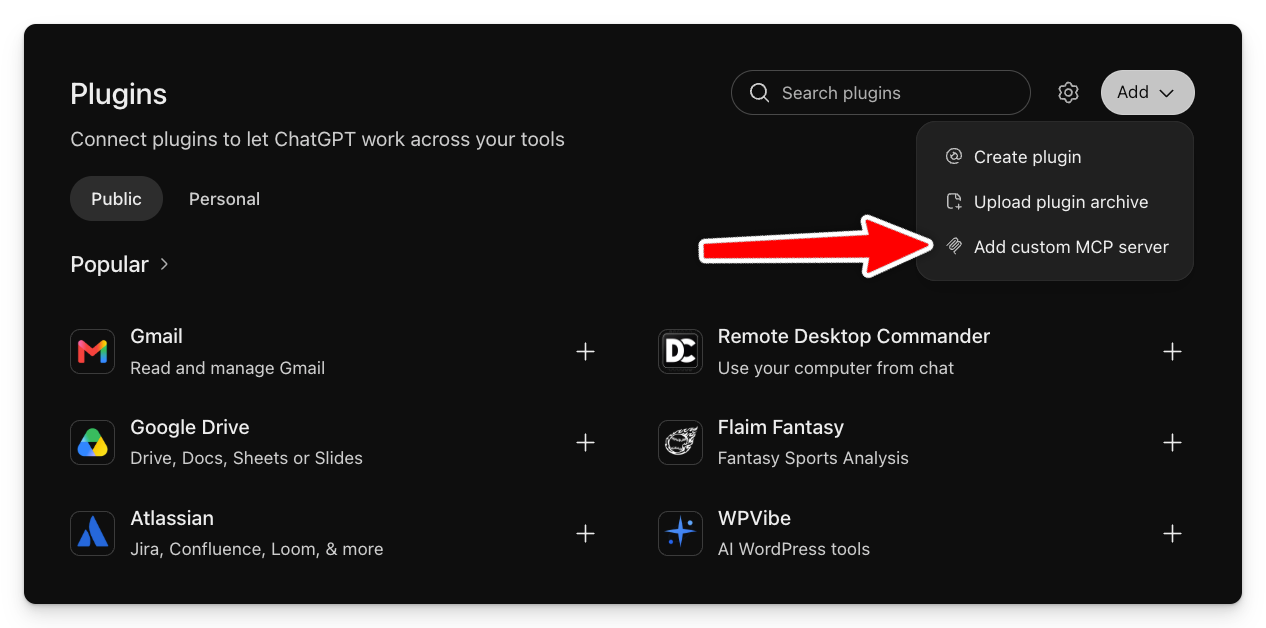
- Open Customize → Plugins.
- Click Add, then Add custom MCP server.
- Enter
ByDefaultas the name and paste the server URL under Connection. Leave Authentication on OAuth. - Tick I understand and want to continue and click Create as a plugin. ChatGPT sends you to ByDefault to approve the connection.
Claude Code
Run this in a terminal:
Then start Claude Code, run /mcp, pick bydefault and choose Authenticate. Claude Code opens ByDefault to approve the connection.
The command adds ByDefault to the project you're in. Add --scope user to use it in every project.
Codex
Run this in a terminal:
Codex opens ByDefault to approve the connection. If it doesn't, run codex mcp login bydefault. The Codex IDE extension reads the same setup, so ByDefault works there too.
Cursor
Add ByDefault to ~/.cursor/mcp.json to use it in every project, or to .cursor/mcp.json inside one project:
If the file already lists servers, add the bydefault entry next to them. Then sign in to ByDefault from Cursor's MCP settings and approve the connection.
VS Code
- Open the Command Palette and run MCP: Add Server.
- Choose HTTP and paste the server URL.
- Enter
bydefaultas the server ID, then choose Global so it works in every workspace. - Allow the sign-in when VS Code asks, and approve the connection.
ByDefault's tools then show up in Copilot Chat.
Gemini CLI
Run this in a terminal:
Then start Gemini CLI and run /mcp auth bydefault to approve the connection.
The command adds ByDefault to the project you're in. Add --scope user to use it in every project.
Other clients
Windsurf, Zed, OpenCode and most other agents connect the same way: add a remote MCP server with the server URL, choose HTTP if it asks for a transport, and approve the connection when it opens ByDefault. A client that can only run local servers can't connect.
MCP can do everything the dashboard can
Your client sees what your dashboard shows and works with the content agent's tools.
- Read your visibility on every prompt, why each model recommends a brand, the pages it cites and the searches it runs. It also reads your competitors, content gaps, articles and Publishing setup, and AI crawler traffic once Analytics is connected.
- Add prompts, topics and competitors. New prompts count toward your plan's tracked prompts and run on your models right away.
- Start a draft from a content gap or a title, edit it, set its target keyword, run the GEO check, and add images, charts, screenshots, diagrams and tweets. It can run code in the article's sandbox with the keys you saved in Settings → Agent keys.
- Preview a publish, publish, or take an article down, on the blogs you set up in Publishing. It can also change your Publishing setup.
An article's first publish uses one article credit, the same as in the app. Billing and team changes stay in the app. See Plans and billing.
Troubleshooting
ChatGPT has no Add custom MCP server option
Your ChatGPT plan or workspace doesn't allow custom servers. On Business and Enterprise workspaces, an admin has to turn them on first.
It can read but can't change anything
MCP agents have the same permissions as your account. If you have the viewer role, ask an owner to make you a Member.
It can't find my project
A client only reaches the projects you picked when you connected it. Disconnect it in Settings → MCP and connect again with the right projects.
Did this answer your question?