API
Your site reads published articles from our API, and a webhook tells it when one changes.
 JoshUpdated 2 min read
How it works
ByDefault keeps your published articles, and your site fetches them and shows them in its own design. A webhook tells your site when an article publishes/changes/unpublishes, so it can rebuild that page.
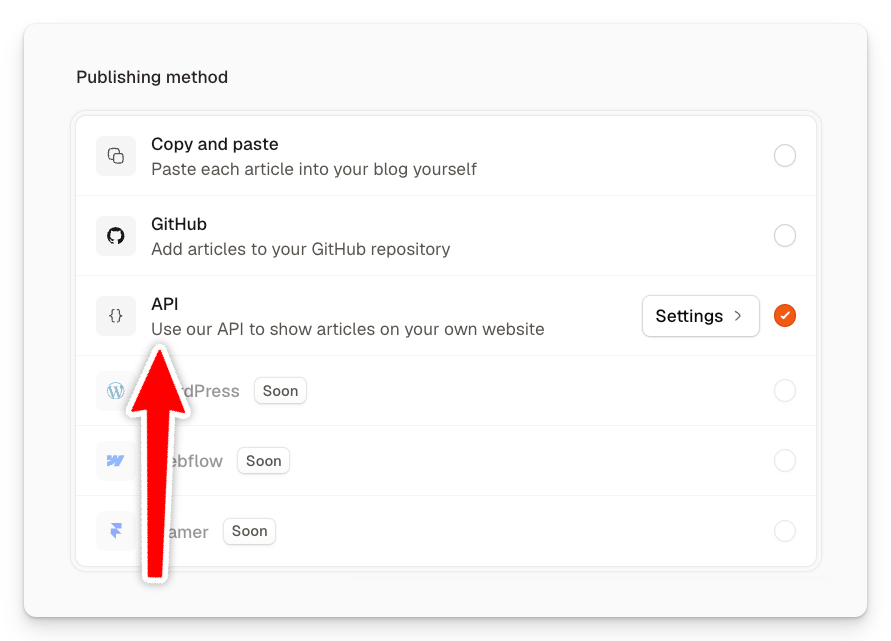
Set up the API
-
In Publishing, click your blog, pick API under Publishing method and save.
-
Click Settings on the API row to copy the Endpoint and your API key.
-
Store the key as an environment variable where your site is deployed, then fetch your articles like the example code from the page. See the full API reference here.
-
Optional: Under Webhooks, enter the address on your site that rebuilds or revalidates a page, such as
https://example.com/api/revalidate, and click Save. Whenever an article changes, your website will show it in a few seconds.
Publish an article
Click Publish in the top right of the article, then Publish now. Your site gets the article as it was when you published it, and you can continue to update it later.
Webhook deliveries shows under Webhooks with the event, the article and what your site answered.
Troubleshooting
I updated a post, but my website doesn't show it
Click Publish in the top right of the article and click Update, then check Webhooks on the API page to see whether your site got the delivery.
My site gets a 401
Your API key is missing or no longer valid. Copy it again or create a new one on the API page.
Webhook deliveries fail
Your site has to answer with a 2xx within 10 seconds. Verify a webhook shows how to check the signature.
Did this answer your question?